

Having two monitors may sound like something from the movie "Hackers", but the reality is far more day to day. After all, how many times have you had a document on the screen, and you needed to switch to your web browser or a spreadsheet - you can only see one at a time - unless to reduce each window size, which is not really a viable solution. The answer to this problem is more screen space.
Of course, you could by a bigger monitor - this does work up to a point - the point where you run out of resolution on one monitor. But adding another monitor, especially having two large monitors, gives you a totally different vista (no pun intended!). With two monitors you can have your browser and massive spreadsheet on screen at the same time. You can be viewing a large webpage and pasting text into your PowerPoint or Word document. In short, having two monitors dramatically improves your productivity.
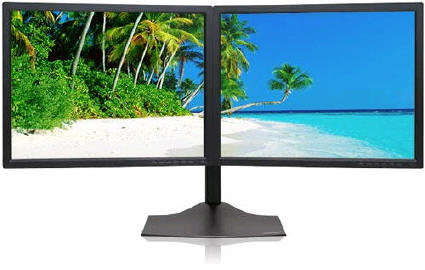
A typical dual monitor setup
Most people don't have any idea how really easy it is to set up dual monitors on their system. However, there is one thing you must have to be able to do it! A second video card. Here is a list of what you would need, but remember, this is an upgrade that almost anyone can perform:
What You Need
• Two Monitors
They can be the same or totally different - two LCD, two tube monitors, one of each. They
can also be different resolutions, and different physical sizes.
• Microsoft Windows XP or Vista
To easily setup dual monitors you can use Windows 2000, but it is much easier with XP or Vista.
• A Second Video Adaptor Card
The second card can be a simple VGA or higher resolution state of the art NVIDIA video card.
Of course, some PCs come with dual monitor support (2 video cards/outputs) built-in - so
check you system before buying a second video card.
• Optional Dual LCD Monitor Stand
If you have two LCD monitors with VESA compatible mounts, a dual monitor stand makes sense
- it saves desk space and mounts both monitors at the same level for better use.
That's it. However, it is recommended to extend the RAM memory in your system to 2GB, as each screen will use memory - but even on a 1GB main memory system, dual monitors work wonderfully.
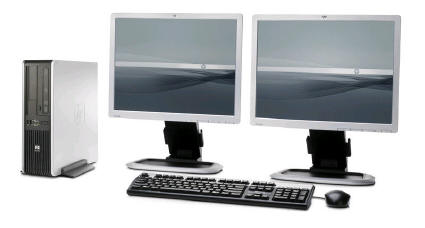
Two Separate Monitors Configured Together
Putting It All Together
You start by selecting your second monitor and video card, then installing the second video card in your computer (following the manufacturer's instructions). Once the second video card is installed (along with its driver, if any), you connect the second monitor, power on the system and open the Windows Control Panel.
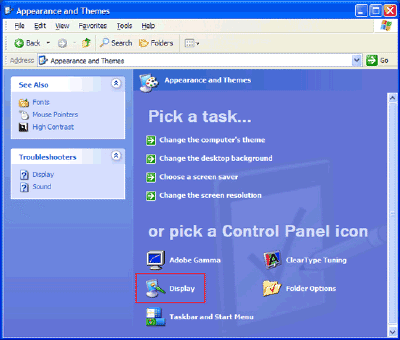
Select Display Properties or Appearance and Themes from the Windows control Panel:
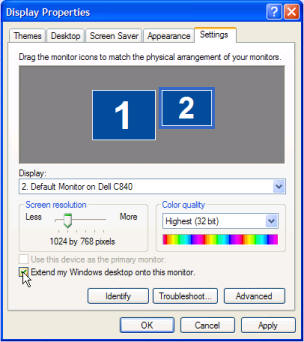
When the Display Properties appears, select "Settings". You should see two monitor icons identified as "1" & "2". (If you do not, you should consult the system and second video card manuals.)
Click on the "2" then on the option to "Extend my Windows desktop onto this monitor". Optionally, you can choose to make the second monitor your primary monitor. You probably want the larger of the two monitors as your primary. But as the video below shows, you have numerous options.
That's all there really is to setting up dual monitors. If you use an optional dual monitor stand, you can recover your desk space, and of course, the monitor stand may need to be assembled. The this is so easy, it is a wonder more users don't use multiple monitors.
Once your dual monitor configuration is set up, you can use your mouse to grab the title bar of a window and drag it to your new display. If a window does not move when you drag it, double-click the title bar first, and then drag it. Having two monitors will forever change the way you work with your computer. Be creative and experiment with the sizing of application windows and what information you can keep in constant view while doing multiple tasks. You will even see that you can have windows split between the two screens!
Setting Up A Typical Monitor Stand
If you want the most professional configuration, you can use one of the very affordable dual monitors stands available. In the following video we show you how to set up your stand and dual monitors.
Dual monitor stands are readily available. Simply return to our website, and enter "Dual Monitor Stand" in the search field.
Most stands will support two monitors up to 22 inch size each, so you can truly take control of your computing.
Using Your Laptop with Dual Monitors
If you have a laptop computer made in the last several years, you can almost certainly support an external monitor by connecting it to the VGA or DVI connector on the back of your computer. The external monitor can easily act as a second display to your laptop's built-in display.
Simply connect the external monitor (acting as your second monitor), and follow the steps above.

More Windows Administration Information:
• Create a Shortcut to Windows 10 Services Management Console
• Disable Indexing to Speed Up Your Computer
• How to Block Unwanted Websites with Your Netgear Router
• Create and Change Password, Picture and User Name in Windows 7
• Application, Program, Process, Service, Thread; What Does it All Mean?
• Find Your WiFi Password on Windows 10
• How to Optimize Your Solid State Drive
• DOS Tasklist and Taskkill Commands
• The Fastest Way to Move PC to PC
• How to Disable Windows Firewall in Windows 7