
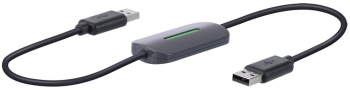
The Belkin Easy Transfer Cable for Windows 7 has you covered when it's time to migrate from a PC running an older version of Windows to a new computer running Windows 7. Don't worry about losing any of your personalized settings, important files, music or treasured family photos. With the Easy Transfer Cable, you'll be able to quickly and seamlessly migrate your data and user settings in a fast, easy, and user-friendly way.
The Easy Transfer Cable was officially designed for the Microsoft Windows Easy Transfer utility, which is featured in Windows 7. All you need to do is connect the cable to USB ports on your old Windows XP or Vista computer to your new Windows 7 machine, and run the utility.
Your user accounts, Windows settings, files and folders, pictures and photos, MP3s and other music, videos, program settings and program data, and e-mail messages, settings, and contacts will all be transferred over to your new computer without a fuss. Thanks to the "Map User Accounts" feature, the destination PC is not required to have matching User Accounts. Gone are the days of losing important email messages or having to reset all your user settings!
Once the transfer done, a post migration report is generated, which gives you a comprehensive view of everything that was transferred. Because of possible incompatibility issues, programs and applications are not transferred to the new computer. Instead, the utility provides a list of all the programs and applications that were installed on the old PC along with links to the latest versions of the programs if they are provided by the software developer.
The Easy Transfer Cable is eight feet long and has two auto-speed selectable, USB type-A male connectors. The USB 2.0 Hi-Speed cable provides transfer speeds of up to 480Mbps and is fully backward compatible with USB 1.1. LEDs on the cable lets you quickly know that the transfers have begun.
You get: The Belkin Easy Transfer Cable, Driver CD, and Product guide.
| Migration⁄Transfer Compatibility: | ||
| XP SP2 32-bit | to | Windows 7 32-bit |
| XP SP2 32-bit | to | Windows 7 64-bit |
| XP SP2 64-bit | to | Windows 7 64-bit |
| Vista SP1 32-bit | to | Windows 7 32-bit |
| Vista SP1 32-bit | to | Windows 7 64-bit |
| Vista SP1 64-bit | to | Windows 7 64-bit |
| Windows 7 32-bit | to | Windows 7 32-bit |
| Windows 7 32-bit | to | Windows 7 64-bit |
| Windows 7 64-bit | to | Windows 7 64-bit |
Joel Peterson from Minnesota says, "The transfer cable worked flawlessly for me. The setup was simple and well instructed; the speed was reasonable (less than an hour for over 8000 10mp photos and around 50 CDs, plus many other files). The price is a little steep for a single use cable, but well worth it when you compare the price/convenience ratio. I was transferring files from a Windows XP Pro 32bit desktop to a Window 7 Home Premier 64bit laptop.
Click here to learn more.

More Windows Administration Information:
• How to Backup Mails and Address Book of Outlook Express
• What Are Windows Server Containers?
• Hard Disk Management
• Guide To Setting Up Dual Monitors
• Cortana, Assistant or Spy?
• How to Setup DHCP (Dynamic Host Configuration Protocol) on a Windows Server
• Put HyperTerminal on Windows 7
• Make Windows 10 File Explorer Open to This PC instead of Quick Access
• The Security and Maintenance of Messages in Outlook Express
• How to Reset Windows 7 Password