
Regulating web browsing can prevent children (and workers) from accessing dangerous content on the internet, or having to make judgment calls over suitable relationships in chat-rooms. The fact is, web sites, chat-room users and downloaded programs may not have the best interests of you and your family at heart. The unscrupulous may try to manipulate the people you care about, or try to gain trust, which may result in unacceptable access to your family, your computer, or personal information.
You can block access to unwanted web content. Here's how to do so with a basic Parental Control tool included free with Windows: Content Advisor. We also examine other software titles with extended features that can help keep your family in safe territory.
1. In Internet Explorer's main menu, select "Tools", and at the bottom of the Tools submenu, select "Internet Options".
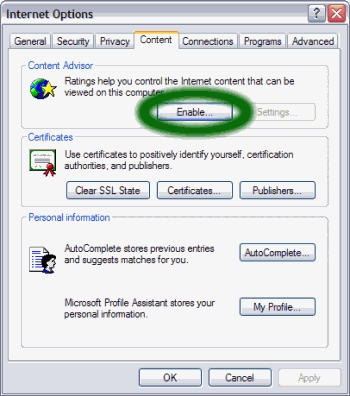
2. In the Internet Options dialog box choose the [Content] tab and click on the [Enable] button.
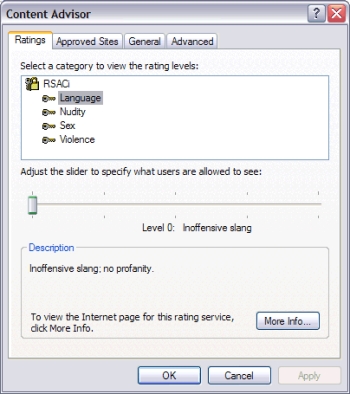
3. Select filter settings for the categories shown: Language, Nudity, Sex, Violence. The further right you push the slider, the more content is allowed.
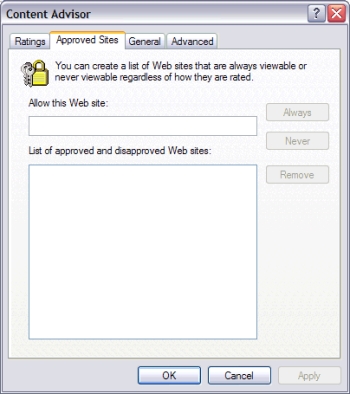
4. Click on the Approved Sites tab. Here you can type in any specific websites that you might want to be treated specially. You can come back and change this list later, perhaps after feedback from your family.
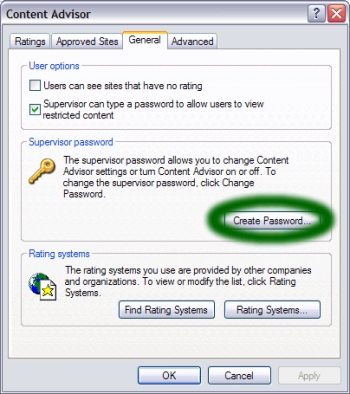
5. Navigate to the General tab, and click on Create Password. This will set you up as Administrator, and prevent other users from altering the Content Advisor settings.
6. Click OK until you've exited the wizard. Now you have enabled Content Advisor and can rest assured that your family can only view rated webpages.
Tips
• If your children (or any other Internet browser in your home) feel that their Internet options are being limited, spend some time reminding them what happens to computers that are completely unprotected, and present the Internet filter as just another part of a good security setup.
• Restricting a child's web usage when they are used to unrestricted access may result in negative behavior. Try to to install an Internet filter at an early stage to get them used to it.
• Content Advisor only filters Internet Explorer, so if a family member installs another web browser such as Firefox, filtering will not be effective. To prevent a user installing another browser (such as Firefox) and bypassing IE's filtering, create another User on your computer, and assign it limited user powers. Get the other users to login using the new user ID, and their ability to install new programs is restricted.
• Resourceful children may try to use "hacks" to bypass your controls:
• Free proxy service websites (search on google for "free web proxy") can hide further webpage browsing from parental controls. Most parental control software will automatically block access to these sites, but check out History logs to view any attempts, and talk to your child to generate agreement on what surfing is acceptable.
• If the child logs in to the computer using an administrator account, they may attempt to turn off Content Advisor by deleting registry settings. Create for them a new account (with limited powers) to restrict their ability to edit the registry.
• Content Advisor may have uses but other software titles have more powerful features:
• Control what programs and games are run.
• Restrict computer use to certain times or days.
• View a list of visited websites.
• Control which websites are accessed.
• Some other programs to consider are as follows:
• K9 Web Protection - a free family tool from a company that designs corporation level web filters and blocks.
• SafeEyes - This is what some schools are installing.
• CyberPatrol - Perhaps the most used program at home. This program also can control access to programs installed on the computer.
• ContentProtect - Includes a remote control feature.
• Integrated Tools - If you are a AOL, MSN or Earthlink subscriber, or you own Norton Internet Security or ZoneAlarm Internet Security,
you already have some parental control tools, as they are integrated into the software.
Warnings
• This restricts ALL users not specific users
• All parental-control programs sometimes over-block or under-block websites. Read software reviews to minimize the risk of installing a program that blocks too many safe sites, or allows access to too much dangerous content.
• Often web browsers are the target of many vulnerabilities and loopholes, particularly popular ones such as Internet Explorer or Firefox are often the target of such exploits, if you feel uncomfortable about this then perhaps you should try a less popular browser like Opera or Konqueror (Linux/Macintosh) which offer different codebases and features. It should be noted however that most security compromises are a result of unsafe computing habits.
• Ask your family to:
• Scan all downloads with your virus checker.
• Avoid programs and services that have not gained your trust.
• Install a program such as Windows Security Essentials to block webpages that are known to try to gain access to your computer.
• If you have a router/modem which provides "always on" internet access, parental control software (indeed Windows itself) can be bypassed by a user booting a custom operating system from a removable drive (this doesn't apply to internet access through a simple USB or dialup modem, where users don't have access to ISP login details).
• Consider installing a physical proxy that controls all web requests at access level. This will probably involve installing a more costly router/firewall with extended features, unless you already have one.
Article source: wikiHow wikiHow is a group effort to create a great resource: the world's largest free how to manual. wikiHow articles help people solve their everyday problems. wikiHow licenses all content under a Creative Commons License. The license allows wikiHow content to be used freely for noncommercial purposes. The Creative Commons License also allows for the creation of derivative works.

More Windows Administration Information:
• Three Important Techniques for Securing a Wireless Network
• How to Setup DHCP (Dynamic Host Configuration Protocol) on a Windows Server
• Configure Windows 10 to Search Windows Only
• NTFS Permissions
• Environment variables in PowerShell
• Msconfig - Microsoft's Secret Weapon to Increase Your Computer's Speed
• Installing a Network Printer on Windows XP and Vista
• DOS Switches and Wild Cards
• Uncomplicated AD Object Management on a Remote Server Domain
• The Security and Maintenance of Messages in Outlook Express