
Nothing becomes obsolete faster than computer equipment. Remember PCs based on the Intel 80386 and 80486 processor? Heck, even PC's based on the Intel Pentium processor are obsolete today. And who still uses a clunky old cathode ray tube monitor? When all this obsolete electronics is disposed of, it creates an enormous amount of waste. The United States alone creates about 3 million tons of electronics waste each year.
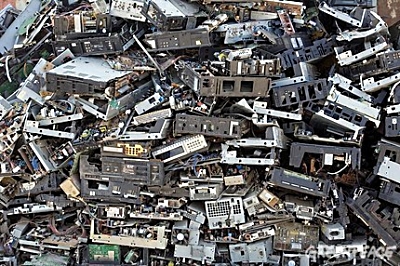
Actually cathode ray tubes are one of the most difficult types of electronics waste to dispose of because they contain high concentration of lead and phosphors. Other toxic substances found in disposed electronics include epoxy resins, fiberglass, PCBs, PVC, cadmium, mercury, thallium, arsenic, and barium. Electronics waste produces a veritable cocktail of toxic waste.
Some electronics waste, such as circuit boards contain valuable metals as copper, silver, gold, and platinum. In order to achieve maximum profit in recycling these metals, much of this electronics waste is sent to developing nations where primitive processing methods cause serious health and pollution problems.
Your first thought in disposing of old computer equipment should be to donate it to a school or charity. For example most states have a branch of StRUT (Students Recycling Used Technology) where you can donate old computer equipment. They use aging or broken computers and other equipment to teach high school students valuable high-tech skills. StRUT then donates the refurbished machines to non-profit organizations and schools.
If you want to send the old computer equipment directly to a recycler, search google with the phrase "recycle computers [your city]". In the search results study the companies information to determine if they actually recycle most of the materials collected them self, of if they export it to one of those developing nations.
Study the companies information to determine if the recycler is ISO 14001 certified and if it follows industry standards. ISO 14001 certified companies must take measures to minimize how their operations negatively affect the environment and must comply with applicable laws and regulations.
In addition to choosing a reputable recycler, it's important to prepare your computer for recycling. One important thing is to clean all data from the computers hard drive before sending it off for recycling. Just deleting the files from the disk isn't enough. Deleting the files is like removing the table of contents. The files are still there, and it's very easy to undelete them. Even formatting a hard drive leaves open the possibility to recover the data.
Disk Wipe is a free, portable Windows application for removing all disk data and preventing recovery of that data. Disk Wipe uses powerful algorithms which fill the volume with useless rubbish binary data multiple times. The possibility of recovering information from drive formatted with Disk Wipe is almost non existent. Disk Wipe is released under GNU - General Public License - free for personal or commercial use, without any restrictions.

More Windows Administration Information:
• Create a Shortcut to Windows 10 Services Management Console
• The Windows 7 Backup and Restore Utility
• How to Install Hyper-V on Windows Server 2019
• How to Configure the msdos.sys file
• Disable Annoying 'Get Windows 10' Message
• WSH to Master Your Computer
• Computer Technician's Guide to Safety
• Uninstall OneNote from Windows 10
• Cortana, Assistant or Spy?
• Configure Windows Indexing Service for Performance