
Windows 10 comes with many pre-installed apps to sucker you into Microsoft's revenue stream generating OneDrive cloud storage. One of those is OneNote, the note-taking app. Since nowadays hard drive storage is running at $20 a terabyte, nobody needs to pay for cloud storage. If you want to remove OneNote from your computer, here's how:
1. In the Start Menu Search box type: PowerShell.
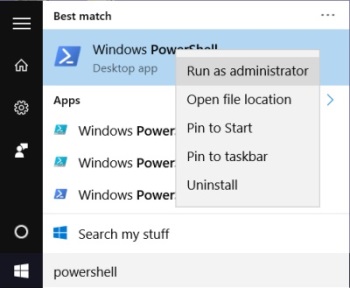
2. Right-click on PowerShell and Click Run as adminstrator.
3. In PowerShell, after the prompt type:
Get-AppxPackage *onenote* | Remove-AppxPackage
4. type exit to close the PowerShell.
You have now removed OneNote from your computer, but be aware, Microsoft will take every opportunity to reinstall it if you're not alert. For example if you install one of Microsoft's office products, OneNote will be installed along with it.

More Windows Administration Information:
• How to Harden a Server
• Make a Shortcut to Create a Restore Point on Windows 10
• Font Basics
• Network Security Through the Principle of Least Privilege
• Planning a Backup and Restoration of Files for Disaster Recovery
• How to Map a Network Folder in Windows 7
• WSH to Master Your Computer
• Put HyperTerminal on Windows 7
• Cortana, Assistant or Spy?
• A Brief Introduction to 3D Printing