
Unfortunately, by default Windows 10 taskbar Search is configured to "Search the Web and Windows", which first connects to Microsoft's bing search engine and searches Microsoft's Windows Store. When I use Search, I don't want to go shopping, I want to search my computer. And If I want to search the Web, I'll use Google. If you feel the same way, here's how to configure Windows 10 to Search Windows Only:
1. Select the Search box next to the "Start" button.
2. Click Settings (next to the gear icon) - a menu of Cortana options appears.
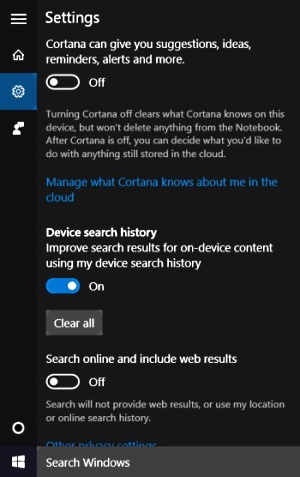
3. Set "Cortana can give you suggestions ..." to Off.
4. Set "Search online and include Web results" to Off.
The search box will now say "Search Windows" instead of "Search the Web and Windows" or "Ask me anything".

More Windows Administration Information:
• DOS Switches and Wild Cards
• Three Important Techniques for Securing a Wireless Network
• Basic Functions of Microsoft Active Directory
• Disable Unnecessary Background Apps
• Introduction to Windows PowerShell
• Security Risks and Ways to Decrease Vulnerabilities in a 802.11b Wireless Environment
• How to Transfer a Large Amount of Data Between Two Windows 10 Computers
• Make Windows 10 File Explorer Open to This PC instead of Quick Access
• Disable Kernal Paging to Speed Up Windows
• Cortana, Assistant or Spy?