
If you download lots of music and videos, rather than fill up your main hard drive, you may have designated a separate drive just for these items. Windows 10 new Storage view makes it easy to direct specific types of media files to your designated drive.
To access Storage view, in Windows 10 StartSettings. In the Settings menu that appears, click on System. In the System submenu, click on Storage.
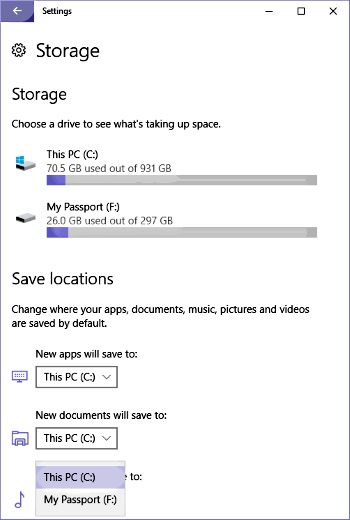
The upper part of Storage view displays the capacity and the amount used of each of the system's storage devices. The lower part of Storage view allows you to select a different destination for a specific type of file.
After selecting the desired drive in the drop down list under the type of file, click on the [Apply] button that appears. Now, in File Manager, the destination storage device for this type of file will be the device that you configured.

More Windows Administration Information:
• How to Become a Microsoft MVP (Most Valuable Professional)
• CompTIA Security+ Made Easy
• PC Technician's Software Copyright Responsibilities
• Create a Windows 7 System Repair Disc
• Computer Data Backups - Test Now or Cry Later
• How to Optimize Your Solid State Drive
• How to Restore Files From File History in Windows 10
• How to Manually Register DLL in Microsoft Windows
• The Windows 7 Backup and Restore Utility
• How to Install Hyper-V on Windows Server 2019