
A "Background App" is a program that runs in the background, usually invisible to the user. Windows 10 has a propensity to allow too many apps to run in the background. This is because the interface features those annoying "live tiles" that are constantly accessing your internet connection in order to fetch new data, and receive notifications so that they can update their tiles.
You may not be interested or even be annoyed by them, but since they're running in the background, they're taking up memory space, using network bandwidth, and if you're using a portable device, draining your battery. Fortunately, Microsoft allows you to control some of the background apps.
In the Start menu, select Settings (the gear icon). In the Windows Settings window that appears, near the bottom, select Privacy. In the Privacy scroll down to the bottom of the left pane and select Background apps.
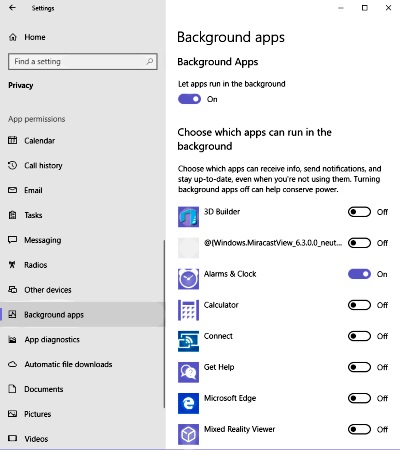
The right pane will now display a list of Background apps, each with a slide switch to to turn it off, preventing it running on startup and staying in the background. Turn off any apps whose live tile updates you're not interested in.

More Windows Administration Information:
• Create a Windows 7 System Repair Disc
• What is Windows Aero and Mouse Gestures?
• Microsoft Licensing Explained
• Network Security Through the Principle of Least Privilege
• Installing a Local Printer on Windows Vista
• How to Disable Windows Firewall in Windows 7
• Turn Off Windows XP Service Pack 2 Firewall
• Computer Technician's Guide to Dealing with Customers
• How to Optimize Your Solid State Drive
• How to Harden a Server