
WMIC (Windows Management Interface Command) is a command line tool that returns information about the system where it's run. To open a command line shell, at the bottom of the screen, left side of the taskbar, in the Windows search text box, type cmd. To learn your computers model, vendor, and serial number, type the command shown below at the command prompt.
wmic csproduct get name,vendor,identifyingNumber
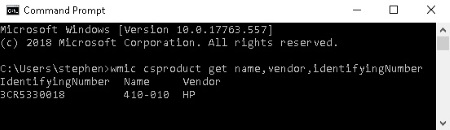
Perfoming an online search with the name and vendor information provided will return loads of information allowing you to find upgrade, troubleshoot, or repair your computer.

More Windows Administration Information:
• Environment variables in PowerShell
• Video Tutorial 3 - The Windows 7 Backup and Restore Utility
• Check Your Version of PowerShell
• DOS Switches and Wild Cards
• Hard Disk Management
• NTFS Permissions
• What is the difference between MSI and EXE Installations?
• Use Windows 10 File History Option to Backup Your Personal Files
• PC Technician Certifications and Professional Organizations
• Free Tool to Uninstall Windows 10 Store Apps