
WMIC (Windows Management Interface Command) is a command line tool that returns information about the system where it's run. To open a command line shell, at the bottom of the screen, left side of the taskbar, in the Windows search text box, type cmd. In the menu that appears, select Command Prompt. To learn your computers model, vendor, and serial number, type the command shown below at the command prompt.
wmic cpu get deviceid,numberofcores,numberoflogicalprocessors
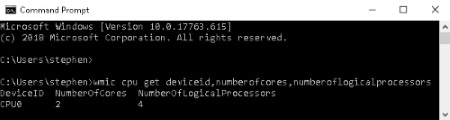
This will return the number of Cores/Logical Processors for each CPU on your machine.

More Windows Administration Information:
• Msconfig - Microsoft's Secret Weapon to Increase Your Computer's Speed
• How to Erase a Hard Disk Drive Permanently
• Tweaks to Speed Up Internet Streaming Video
• Planning a Backup and Restoration of Files for Disaster Recovery
• Computer Technician's Guide to Electronics Disposal and Recycling
• Free Tool to Uninstall Windows 10 Store Apps
• Disable Annoying 'Get Windows 10' Message
• Uncomplicated AD Object Management on a Remote Server Domain
• How to Manually Register DLL in Microsoft Windows
• Use Windows 10 File History Option to Backup Your Personal Files