
RSA is a public-key encryption system designed by Ron Rivest, Adi Shamir and Leonard Adleman. It uses a set of keys, EK (Endorsement Key), SRK (Storage Root Key) and AIK (Attestation Identity Key), that protect a device against unauthorized firmware and software modifications. A TPM (Trusted Platform Module) is a chip on a computer board that securely stores the RSA encryption keys.
One of the requirements for Windows 11 is TPM version 2.0. If you have Windows 10 (the only version of that can be upgraded to Windows 11), and you have TPM version 2.0 module, and it's enabled, then (if all other system requirements are met) you can install and run Windows 11. Here is how to determine if you have TPM version 2.0:
In the Start menu, select Settings (the gear icon). In Windows Settings, scroll down to and click on Update & Security. In the Update & Security window, click on the Windows Security shield icon. In the Protection areas list that appears, select Device Security.
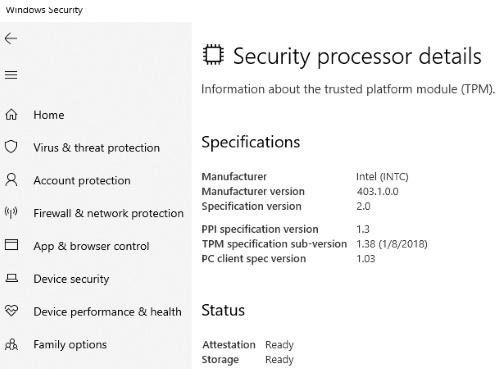
Under Device Security, Security Processor should be listed. If Security Processor is listed, select it to verify the specification version and if it is activated.

More Windows Administration Information:
• Video Tutorial 3 - The Windows 7 Backup and Restore Utility
• How to Manually Register DLL in Microsoft Windows
• Configure Vista's Data Execution Prevention
• Top Ten RAID Tips
• The Windows 7 Backup and Restore Utility
• What Are Windows Server Containers?
• For Quick Information About System - DOS Systeminfo Command
• Is Your Critical PC Data Adequately Protected From Disaster?
• Planning a Backup and Restoration of Files for Disaster Recovery
• Common Issues With Windows Firewall