
If you connect to the Internet, allow other people to use your computer, or share files with others, you should take steps to protect your computer from harm. Why? Because there are computer criminals (sometimes called hackers or crackers) who attack other people's computers. These people can attack directly, by breaking into your computer through the Internet and stealing your personal information, or indirectly, by creating malicious software (or malware) designed to harm your computer.
Fortunately, you can protect yourself by taking a few simple precautions. This article describes the threats and what you can do to defend against them.
Check Your Security Status With Windows Security Center
Windows Security Center is your headquarters for computer security. It shows your computer's current security status and recommends anything that you should do to help make your computer more secure. To open it:
Open Security Center by clicking the Start button, clicking Control Panel, clicking Security, and then clicking Security Center.
Security Center checks your computer for these security essentials:
• Firewall. A firewall can help protect your computer by preventing hackers or malicious software from gaining access to it.
• Automatic updating. Windows can routinely check for updates for your computer and install them automatically.
• Malware protection. Antivirus software can help protect your computer against viruses, worms, and other security threats. Antispyware software can help protect your computer from spyware and other potentially unwanted software.
• Other security settings. Security Center checks for proper Internet security settings and whether User Account Control is turned on. For more information, see User Account Control Overview.
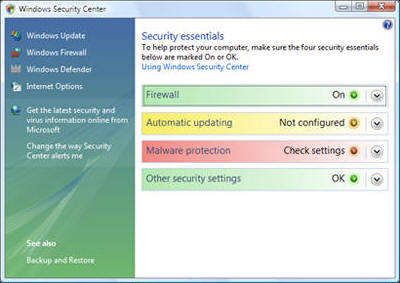
If any of the security items have a red or yellow background, your computer might be vulnerable to security threats. To fix the problem, click an item to expand it, and then follow the instructions.
What Are Security Alerts?
If Windows detects that your computer might need enhanced security in any one of the security areas—firewall, automatic updating, malware protection, or other security settings—you will see a notification every time you log on until the problem is fixed. Notifications are displayed in the notification area of the taskbar.
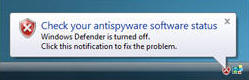
Click the notification to open Security Center, where you can learn how to fix the problem.
Note: To turn off security notifications or hide the Security Center icon in the notification area, open Security Center, click Change the way Security Center alerts me, and then choose an option. Even if you turn off notifications, Security Center will continue to check and display security status.
Use A Firewall
A firewall is software or hardware that checks information coming from the Internet or a network and then either turns it away or allows it to pass through to your computer, depending on your firewall settings. In this way, a firewall helps prevent hackers and malicious software from gaining access to your computer.
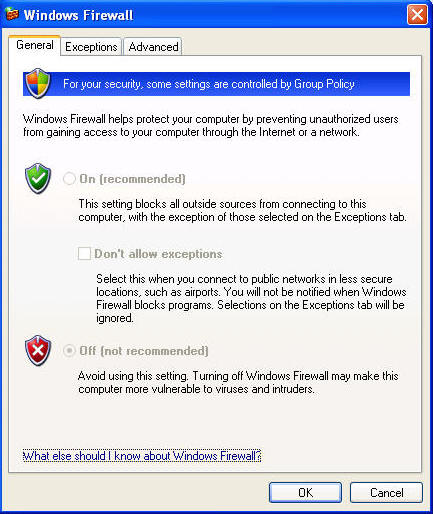
Windows Firewall is built into Windows and is turned on automatically. Make sure it's on.
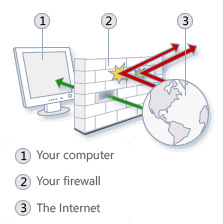
If you run a program, such as an instant messaging program, or a multiplayer network game that needs to receive information from the Internet or a network, the firewall asks if you want to block or unblock (allow) the connection. If you choose to unblock the connection, Windows Firewall creates an exception so that the firewall won't bother you when that program needs to receive information in the future.
Use Virus Protection
Viruses, worms, and Trojan horses are programs created by hackers that use the Internet to infect vulnerable computers. Viruses and worms can replicate themselves from computer to computer, while Trojan horses enter a computer by hiding inside an apparently legitimate program, such as a screen saver. Destructive viruses, worms, and Trojan horses can erase information from your hard disk or completely disable your computer. Others don't cause direct damage, but worsen your computer's performance and stability.
Antivirus programs scan e-mail and other files on your computer for viruses, worms, and Trojan horses. If one is found, the antivirus program either quarantines (isolates) it or deletes it entirely before it damages your computer and files.
Windows does not have a built-in antivirus program, but your computer manufacturer might have installed one. Check Security Center to find out if your computer has antivirus protection. If not, go to the Microsoft Antivirus Partners webpage to find an antivirus program.
Because new viruses are identified every day, it's important to select an antivirus program with an automatic update capability. When the antivirus software is updated, it adds new viruses to its list of viruses to check for, helping to protect your computer from new attacks. If the list of viruses is out of date, your computer is vulnerable to new threats. Updates usually require an annual subscription fee. Keep the subscription current to receive regular updates.
 If you do not use antivirus software, you expose your computer to damage from malicious
software. You also run the risk of spreading viruses to other computers.
If you do not use antivirus software, you expose your computer to damage from malicious
software. You also run the risk of spreading viruses to other computers.
Use Spyware Protection
 Spyware is software that can display advertisements, collect information about
you, or change settings on your computer, generally without appropriately
obtaining your consent. For example, spyware can install unwanted toolbars, links,
or favorites in your web browser, change your default home page, or display
pop-up ads frequently. Some spyware displays no symptoms that you can detect,
but it secretly collects sensitive information, such as which websites you
visit or text that you type. Most spyware is installed through free software that
you download, but in some cases simply visiting a website results in a spyware infection.
Spyware is software that can display advertisements, collect information about
you, or change settings on your computer, generally without appropriately
obtaining your consent. For example, spyware can install unwanted toolbars, links,
or favorites in your web browser, change your default home page, or display
pop-up ads frequently. Some spyware displays no symptoms that you can detect,
but it secretly collects sensitive information, such as which websites you
visit or text that you type. Most spyware is installed through free software that
you download, but in some cases simply visiting a website results in a spyware infection.
Today's Antivirus Products Also Offer Anti-Spyware Protection
To help protect your computer from spyware, use an antispyware program. This version of Windows has a built-in antispyware program called Windows Defender, which is turned on by default. Windows Defender alerts you when spyware tries to install itself on your computer. It also can scan your computer for existing spyware and then remove it.
Because new spyware appears every day, Windows Defender must be regularly updated to detect and guard against the latest spyware threats. Windows Defender is updated as needed whenever you update Windows. For the highest level of protection, set Windows to install updates automatically (see below).
Update Windows Automatically
Microsoft regularly offers important updates to Windows that can help protect your computer against new viruses and other security threats. To ensure that you receive these updates as quickly as possible, turn on automatic updating. That way, you don't have to worry that critical fixes for Windows might be missing from your computer.
Updates are downloaded behind the scenes when you're connected to the Internet. The updates are installed at 3:00 A.M. unless you specify a different time. If you turn off your computer before then, you can install updates before shutting down. Otherwise, Windows will install them the next time you start your computer.
To turn on automatic updating:
1. Open Windows Update by clicking the Start button, clicking All Programs, and then clicking Windows Update.
2. Click Change settings.
3. Make sure Install updates automatically (recommended) is selected. Windows will install important updates for your computer as they become available. Important updates provide significant benefits, such as improved security and reliability.
4. Under Recommended updates, make sure the Include recommended updates when downloading, installing, or notifying me about updates check box is selected, and then click OK. Recommended updates can address non-critical problems and help enhance your computing experience. Administrator permission required If you are prompted for an administrator password or confirmation, type the password or provide confirmation.
Use A Standard User Account
When you log on to your computer, Windows grants you a certain level of rights and privileges depending on what kind of user account you have. There are three different types of user accounts: standard, administrator, and guest.
Although an administrator account provides complete control over a computer, using a standard account can help make your computer more secure. That way, if other people (or hackers) gain access to your computer while you are logged on, they can't tamper with the computer's security settings or change other user accounts.
To determine your account type: Open User Accounts by clicking the Start button Picture of the Start button, clicking Control Panel, clicking User Accounts and Family Safety (or clicking User Accounts, if you are connected to a network domain), and then clicking User Accounts.
The account type appears under your name.
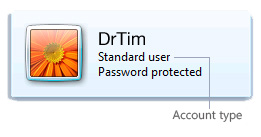
If you are currently using an administrator account, see Change a user's account type to learn how to change it to a standard account.
Tips for Using e-mail and the Web Safely
• Use caution when opening e-mail attachments. e-mail attachments (files attached to e-mail messages) are a primary source of virus infection. Never open an attachment from someone you don't know. If you know the sender but were not expecting an attachment, verify that the sender actually sent the attachment before you open it. See When to trust an e-mail message and Avoiding e-mail viruses.
• Guard your personal information carefully. If a website asks for a credit card number, bank information, or other personal information, make sure that you trust the website and verify that its transaction system is secure. See When to trust a website.
• Use the Phishing Filter in Internet Explorer. Phishing is the practice of creating fraudulent e-mail messages and websites in order to trick computer users into revealing personal or financial information. The fraudulent e-mail message or website appears to be from a trusted source, such as a bank, credit card company, or reputable online merchant. The Phishing Filter helps detect phishing websites to protect you from scams.
• Be careful when clicking hyperlinks in e-mail messages. Hyperlinks (links that open websites when you click them) are often used as part of phishing and spyware scams, but they can also transmit viruses. Only click links in e-mail messages that you trust.
• Only install add-ons from websites that you trust. Web browser add-ons, including ActiveX controls, allow webpages to display things like toolbars, stock tickers, video, and animation. However, add-ons can also install spyware or other malicious software. If a website asks you to install an add-on, make sure that you trust it before doing so.
Security And Privacy Features In Internet Explorer
Internet Explorer offers a number of features to help protect your security and privacy when you browse the web.
Internet Explorer includes the following security features:
• Phishing Filter, which can help protect you from online phishing attacks, fraud, and spoofed websites.
• Protected Mode, which can help protect you from websites that try to save files or install programs on your computer. For more information, see What does Internet Explorer protected mode do?
• Pop-up Blocker, which can help block most pop-up windows.
• Add-on Manager, which lets you disable or allow web browser add-ons and delete unwanted ActiveX controls.
• Notification when a website is trying to download files or software to your computer.
• Digital signatures, which tell you who published a file and whether it has been altered since it was digitally signed. For more information, see What is a digital signature?
• A 128-bit secure (SSL) connection for using secure websites. This helps Internet Explorer create an encrypted connection with websites run by banks, online stores, medical sites, or other organizations that handle sensitive customer information. For more information, see How to know if an online transaction is secure.
By default, Internet Explorer is set to provide a level of security that can help protect you against common threats, such as spyware or other types of malware, when browsing the web. These settings can help protect against known security threats, such as websites installing add-ons or other programs without your knowledge.
Internet Explorer provides the following features that can help protect your privacy when you're online:
• Privacy settings that specify how your computer handles cookies. For more information, see Change Internet Explorer Privacy settings.
• Privacy alerts that let you know when you try to go to a website that doesn't meet the criteria in your privacy settings.
• The ability to view a website's privacy statement.
To change your Internet Explorer security settings:
1. Open Internet Explorer by clicking the Start button , and then clicking Internet Explorer.
2. Click the Tools button, and then click Internet Options.
3. Click the Security tab.
4. Click the Internet icon.
5. Do one of the following:
• To pick a preset security level, drag the slider.
• To change individual security settings, click Custom level. Change the settings as desired and click OK when you are done.
• To set Internet Explorer back to the default security level, click Default level.
6. When you are finished making changes to the security settings, click OK.
To change your Internet Explorer privacy settings:
1. Open Internet Explorer by clicking the Start button Picture of the Start button, and then clicking Internet Explorer.
2. Click the Tools button, and then click Internet Options.
3. Click the Privacy tab.
4. Under Settings, do either of the following:
• To allow or block cookies from specific websites, click Sites.
• To load a customized settings file, click Import. These are files that modify the rules that Internet Explorer uses handle cookies. Since these files can override default settings, you should only import them if you know and trust the source.
5. When you are finished making changes to your privacy settings, click OK.

More Windows Administration Information:
• How to Stay Safe on Public Wi-Fi
• Computer Architecture, Hardware domain of the CISSP Exam
• Keep Your Firefox Browsing Private
• Has Malware Turned Off Your PC's User Account Control?
• Top Features to Look for in Antivirus Software
• FREE Antivirus Software AVG
• Computer Technician's Guide to Biometric Security Devices
• Smart Card
• Easiest Ways to Beat Ransomware
• Firefox Security Options