
Is your PC infected with a malware that your regular anti-virus program can't get rid of? Give McAfee Labs free Stinger utility a try. Stinger is not a program that you can use as a substitute for full anti-virus protection. Instead, its a tool to assist users and administrators in dealing with an infected system. Its power lies in its ability to detect and remove specific viruses. It uses next-generation scan technology to expose malware in places that a regular anti-virus program can't find them.
Download the latest version of Stinger here. When prompted, save the file to a convenient location such as a Desktop folder.
There's a good chance that Windows System Protection has made a back up copy of the malware ans saved it in one or more Restore Points. So you should turn off System Protection.
1. In Control Panel select the System and Security group.
2. In the System and Security group, select System.
3. In the left panel of the System page, select System Protection. If the User Account Control message box appears, click on the [Yes] button.
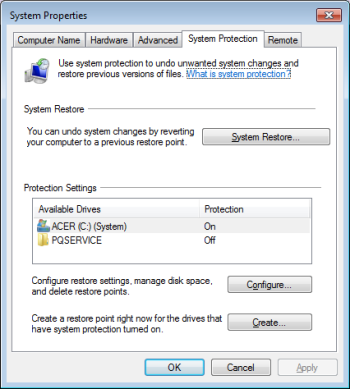
4. In the System Properties dialog box that appears, on the System Protection tab, click on the [Configure...] button.
5 In the System Protection dialog box that appears, set the radio button next to Turn off system protection.
Note: Disabling System Protection will delete all existing restore points. After using Stinger to remove the malware, re-enable System Protection by following the steps above, but unsetting the radio button next to Turn off system protection.
Note: These steps are for Windows 7, different versions require slightly different steps.
After turning off System Protection, navigate to the folder that contains the downloaded Stinger file, and run it.
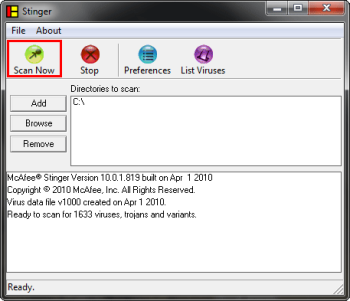
The Stinger interface will be displayed. By default, the C: drive will be set to be scanned. If necessary, click the [Add] or [Browse] button to add additional drives and directories to scan.
Then click the [Scan Now] button to begin scanning. By default, Stinger will repair all infected files found.
Today's malware is extremely aggressive and your regular anti-virus program may encounter a malware it can't get rid of. McAfee Labs free Stinger utility is another tool in your arsenal to detect and remove specific viruses.

More Windows Administration Information:
• Botnets - What Are They?
• Video - Protect Your Files with Free SafeHouseExplorer Encryption Application
• How to Remove Virus Without Internet Access
• Root Kit - The Hackers Backdoor to Your Computer
• Computer Architecture, Operation of Microprocessor, and the CISSP Exam
• Top Features to Look for in Antivirus Software
• Beware The Many Forms of Ransomware
• Social Engineering Attack Counter Measures
• Phishing Attacks
• Disable Remote Access