
A biometric security device uses biological identifiers that are unique to individuals to allow access to a computer or other electronic device. Some unique biological identifiers are voice authentication, the iris of your eye, even face recognition. One common biometric device is a fingerprint reader.
Some keyboards and laptop computers have built-in fingerprint readers, and there are also USB fingerprint readers. It allows access by comparing the prospective user's fingerprint to the one stored by the authorized user during initial setup.
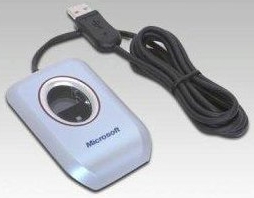
The driver software should be installed before the USB fingerprint reader is connected. After the software is installed, connect the fingerprint reader to the USB port. A configuration screen will appear. It will require you to press your finger against the reader. It reads the finger several times, and stores the results. After this, you can log on to your computer, or your favorite Web sites with the press of your finger.
The benefits of a biometric security device is that the user doesn't have to remember a username or password to access the system, and a hacker can't use a password generating algorithm to gain access to the system. Most biometric security devices come with an account management system which allows several different user accounts to be configured.

More Windows Administration Information:
• Top Eleven Tips for Safe Computing
• Set Windows Defender to Scan Core Operating System Files
• What is Spyware?
• Disable Remote Access
• Keep Your Firefox Browsing Private
• Five Things You Can Do To Improve Your Company's Security
• FREE Antivirus Software Avast!
• Ransomware and How To Protect Yourself
• Fundamentals of Windows Security
• Turn On Your Browser's Phishing Filter