The power coming into a computer is the most critical component, and it may be one of the most overlooked. It is just taken for granted that it will always be there and working properly.
Welcome to Bucaro TecHelp!

Welcome to Bucaro TecHelp!
Maintain Your Computer and Use it More Effectively
to Design a Web Site and Make Money on the Web

About Bucaro TecHelp About BTH User Agreement User Agreement Privacy Policy Privacy Site Map Site Map Contact Bucaro TecHelp Contact Advertise on Bucaro TecHelp Advertise Here RSS News Feeds News Feeds


Computer Repair with Diagnostic Flowcharts

Troubleshoot PC Hardware Problems With Flowcharts

This manual for troubleshooting PC hardware problems creates a visual expert system for diagnosing component failure and identifying conflicts.

The seventeen diagnostic flowcharts at the core of this book are intended for the intermediate to advanced hobbyist, or the beginning technician.

Click Here

Power and Your PC

The power coming into a computer is the most critical component, and it may be one of the most overlooked. It is just taken for granted that it will always be there and working properly.

A top of the line processor and ultra powerful video card do nothing if a system does not receive the ample, stable power it demands. Having quality components providing and regulating the power supplied to a computer is critical, and this brief overview looks at a few areas worth consideration.

Power Supplies

Computer power supplies take the high (110V or 220V) DC voltages from an electrical outlet and convert it to the various lower AC voltages required for a system to operate. The typical voltages required inside a computer are 3.3V, 5V, and 12V, where the 3.3V and 5V lines are generally used to power circuitry, and the 12V line provides power to run items such as hard drives, optical drives, and cooling fans.

Power supplies are sold in terms of their total power output, in terms of wattage. Choosing the correct power supply means not only finding one that will provide enough power for all of the components connected to the system, but also one that is the correct size physically, has enough connections for typical drives and fans, and if necessary, that also has special connections for things such as Serial ATA drives and modern video cards.

Choosing a power supply with enough power shouldn't be much of a problem, as having more power than you need is never a bad thing. Just because a power supply is rated for 400W, or perhaps 600W, does not imply that it is drawing that at any given time. It just indicates the total power available to the various lines inside the computer.
For those interested in getting a good idea of their minimum power requirements, this Power Wattage Calculator is a convenient reference. In addition to checking out the total wattage of a power supply, looking for strong amperage ratings on the 3.3V, 5V, and 12V lines is also recommended, as power supplies with identical total power ratings may distribute the power to the various lines in different quantities.

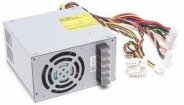
ATX power supply

Power supplies come in a few different physical sizes, but the most common are designed to fit the standard ATX and micro ATX (mATX) form factor cases. A typical ATX power supply, such as this Echo-Star 680W unit, measures 3.25" x 6" x 5.5" and features two cooling fans to not only cool the power supply, but to also help draw hot air out of the computer.

RSS Feed RSS Feed


Computer Sections

Troubleshooting and Maintaining Your PC All-in-One For Dummies

Troubleshooting and Maintaining Your PC All-in-One For Dummies

Diagnose and solve your PC problems with this easy-to-understand guide. It shows you how to diagnose and solve the most common hardware and software problems your PC may encounter.

It also provides you with methods for preventing PC problems in the first place and clearly explains how to create a safe and secure PC environment.

• Walks you through ways to diagnose the most common PC hardware, software, and operating system problems.
• Gives clear and easy-to-understand solutions for confidently handling these problems.
• Provides methods to maintain your system to prevent future problems.
• Reviews an array of useful diagnostic and maintenance tools.
• Covers Windows Vista and Windows 7.

Troubleshooting and Maintaining Your PC All-in-One For Dummies helps you to confidently handle whatever PC problems you may encounter. Click here for more information.


TigerDirect
[Site User Agreement] [Advertise on This site] [Search This Site] [Contact Form]
Copyright©2001-2011 Bucaro TecHelp 13771 N Fountain Hills Blvd Suite 114-248 Fountain Hills, AZ 85268

