Power Supply Form Factors
By Stephen Bucaro
The shape and physical layout of a power supply is called its "form factor".
Power supplies come in several industry standard form factors. Power supplies
with the same form factor are physically interchangeable. Although two power
supplies may have the same form factor, they can differ in quality, power
rating, features, and efficiency. Make sure to purchase a power supply that not
only has the proper form factor to fit into your computers case, but also has
the required power rating to drive your motherboard and other system components.
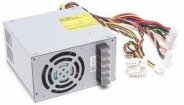
The most common power supply form factor is ATX (also called NLX). The ATX power
supply is 150 mm wide, 146 mm deep and 74 mm high. A low-profile version of the
ATX is the LPX. The LPX is the same as the ATX/NLX except the power outlet for
the monitor has been removed.
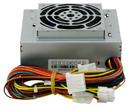
Another power supply form factor called SFX (S for "Small" Form Factor) is for
use in compact systems. The SFX power supply is 100 mm wide, 125 mm deep and
83.5 mm high. It uses a 60 mm cooling fan. An optional configuration uses a
larger 80 mm fan on the top of the power supply for improved system cooling.
This increases the height of the supply by about 10 mm. Another optional
configuration is an extra-small 100 x 125 x 50 dimensions that uses a 40 mm fan.
This configuration requires an additional fan on the case because the small 40 mm
fan is only sufficient to cool the power supply itself.
The power supply fan is used to exhaust air out the back of the supply through a
hole in the case. The advantage of having the fan exhaust air out of the case is
that the case is pressurized so the system runs cleaner, free from dust and dirt.
A power supply can provide up to three motherboard power connectors that are
keyed, making plugging them in backwards impossible. The connector provides +/-
12, +/- 5, and +3.3 volts. To prevent the computer from starting up until after
the power to stabilizes, the power supply puts out a signal to the motherboard
called "Power Good" (PWR_OK).
Another set of signals furnished by an ATX power supply is the Power_On (PS_ON)
and5v standby (5VSB) outputs. The 5v standby power is always live, giving the
motherboard a limited source of power even when off. This enables such features
as Wake on Ring or Wake on LAN, in which a signal from a modem or network adapter
can cause a PC to wake up and power on. Many systems have the option of setting a
wake-up time, at which the PC can automatically turn itself on to perform scheduled tasks.
Although two power supplies may have the same form factor, they can differ in quality,
power rating, features, and efficiency. Make sure to purchase a power supply that not
only has the proper form factor to fit into your computers case, but also has
the required power rating and features to drive your motherboard and other system components.
More Computer Anatomy Articles:
• Hardware Resources Explained
• A Definitive Guide on How to Choose Your New PC
• The Computers Back Connector Panel
• PC Motherboard Expansion Cards
• Rambus DRAM (RDRAM)
• PC Disk File Systems
• What is Bluetooth?
• An Overview of the Printed Circuit Board (PCB) Fabrication Process
• Serial ATA Hard Drive
• Digital Video Interface (DVI)
| 

 About BTH
 User Agreement
 Privacy
 Site Map
 Contact
 News Feeds


 RSS Feed
 Follow @Stephen Bucaro
 Windows Troubleshooting


