Intermediate PC Build-it-Yourself Guide
Building a Fast, Powerful System
Before you get out your tool kit and put your anti-static mat on the floor, you have
to consider a few factors before embarking on your computer-building odyssey? Now don't
panic - it's not as complicated as it seems. But above all, you must first determine what
you can afford to spend. Obviously, the size of your PC building budget will have a
dramatic impact on the kind of system you create.
Why would you want to build your own computer?
1. Most manufactured computers are build using proprietary components. When (not if)
your computer breaks down, you can’t use off-the-shelf replacement parts. You have to
pay a lot more for the manufacturers proprietary replacement parts.
2. Low-cost manufactured computers use the cheapest components. These components are
marginal or below specifications. When you build your own computer, you select the
quality of each component.
3. When you have built your own computer, you are more knowledgeable and capable of
performing your own troubleshooting. You don’t have to pay $75.00 per hour for
a service technician.
4. When your computer becomes outdated, you can easily upgrade it yourself. You will
be a better judge of when it’s more logical to build a new computer from scratch, or
to update the old one.
5. You will feel the pride and confidence of having built your own computer. And, you
will have proof that you really are smarter than your friends!
The system we'll discuss in this article is based on a modest budget, but features a
fast, powerful processor, a solid motherboard, excellent memory, an ample hard drive and
a great video card. Once you've decided how much you want to spend it's time to make a
couple of key decisions - what processor you'll use and which motherboard suits your needs.
Your Core Component - the CPU
We strongly advise that you select your CPU before you make final decisions on your other
components, because everything you want your PC to achieve is built around the processor.
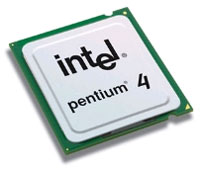
Intel Pentium 4 Processor
In this article we are going to describe a fast, powerful system that will support great
graphics, superior networking, outstanding multimedia entertainment and can run games with
the best of them. We also want to make sure our computer can multi-task smoothly and productively.
So, we've chosen an Intel Pentium 4 2.8 GHz processor with 800MHz FSB with a 1MB cache.
This swift processor features HyperThreading Technology for exceptional multitasking
ability. This Pentium 4 2.8 processor is only compatible with Socket 775 motherboards.
| 

 About BTH
 User Agreement
 Privacy
 Site Map
 Contact
 News Feeds


 RSS Feed
 Follow @Stephen Bucaro
 Windows Troubleshooting


