Tips and Techniques For Building Your Own PC
|
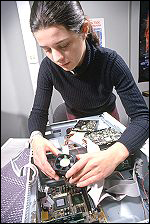
First things first. What do you need to build a computer? Believe us, it's not
as complicated as it seems. Let's start with the case. The variety is staggering,
with hundreds of styles, shapes and sizes available. We recommend that you look
closely at the features. Some gorgeous PC cases are nightmares to work with, or are
cheaply built. Get the best case you can afford, we recommend you ask for "tool-less"
case design, which enables you to click - open, click - closed.
|
|
Most cases and motherboards use the ATX Formfactor, standardizing the sizes of
the components and all of the power connections. Speaking of power: Although many
PC cases are sold with a pre-installed power supply, check it carefully - your power
requirements may exceed the capacity of the pre-installed unit. How do you know?
Here's a quick guide:
Component Wattage Required
| Component | Wattage Required |
| Motherboard | 15-30 |
| Low-end CPU | 20-50 |
| Midrange to high-end CPU | 40-100 |
| RAM | 7 per 128MB |
| PCI add-in card | 5 |
| Low to midrange graphics board | 20-60 |
| High-End graphics board | 60-100 |
| IDE hard drive | 10-30 |
| Optical drives | 10-25 |
Do the math. You may need to purchase a higher-output power supply for your
new PC. Once you've selected a case and power supply, be sure that you have
the following items:
- A set of screwdrivers (small, large, slot, Phillips), or a PC Tool Kit
- An anti-static wrist strap
- Needle-nosed pliers
- CPU (processor)
- CPU cooling fan and heat sink
- Sound Card
- Motherboard
- One or more hard drives
- Graphics card
- One or more RAM DIMMs (Memory modules)
- An operating system
That's basically it. And these days, anyone can build or upgrade a computer.
It's really very simple and it can save you hundreds of dollars.
|


 About BTH
 User Agreement
 Privacy
 Site Map
 Contact
 News Feeds


 RSS Feed
 Follow @Stephen Bucaro
 Windows Troubleshooting


