Hard Disk Drive Basics
Article reprinted with permission of NTFS.com
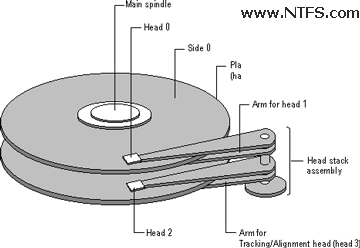
A hard disk is a sealed unit containing a number of platters in a stack.
Hard disks may be mounted in a horizontal or a vertical position. In this
description, the hard drive is mounted horizontally.
Electromagnetic read/write heads are positioned above and below each
platter. As the platters spin, the drive heads move in toward the center
surface and out toward the edge. In this way, the drive heads can reach the
entire surface of each platter.
Making Tracks
On a hard disk, data is stored in thin, concentric bands. A drive head,
while in one position can read or write a circular ring, or band called a
track. There can be more than a thousand tracks on a 3.5-inch hard disk.
Sections within each track are called sectors. A sector is the smallest physical
storage unit on a disk, and is almost always 512 bytes (0.5 kB) in size.
The figure below shows a hard disk with two platters.
The structure of older hard drives (i.e. prior to Windows 95) will refer to a
cylinder/ head/ sector notation. A cylinder is formed while all drive heads are
in the same position on the disk. The tracks, stacked on top of each other form
a cylinder. This scheme is slowly being eliminated with modern hard drives. All
new disks use a translation factor to make their actual hardware layout appear
continuous, as this is the way that operating systems from Windows 95 onward like to work.
To the operating system of a computer, tracks are logical rather than physical
in structure, and are established when the disk is low-level formatted. Tracks
are numbered, starting at 0 (the outermost edge of the disk), and going up to the
highest numbered track, typically 1023, (close to the center). Similarly, there
are 1,024 cylinders (numbered from 0 to 1023) on a hard disk.
The stack of platters rotate at a constant speed. The drive head, while
positioned close to the center of the disk reads from a surface that is passing
by more slowly than the surface at the outer edges of the disk. To compensate
for this physical difference, tracks near the outside of the disk are less-densely
populated with data than the tracks near the center of the disk. The result of
the different data density is that the same amount of data can be read over the
same period of time, from any drive head position.
| 

 About BTH
 User Agreement
 Privacy
 Site Map
 Contact
 News Feeds


 RSS Feed
 Follow @Stephen Bucaro
 Windows Troubleshooting


