How to Choose a Computer Case
By Stephen Bucaro
Computer cases come in many sizes, configurations, and with many features. Which
case you need depends upon what you will use your computer for. If you're going to
use it for typical home computer uses like word processing and spread sheets, you
might choose a standard mid-tower ATX Case. Shown below is Ultra's Mid-Tower ATX Case.
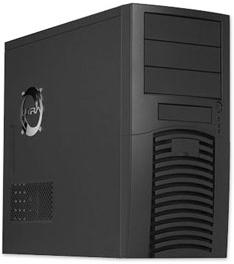
This case has 3 external 5.25"" drive bays, 1 external 3.5" drive bay, 5 internal 3.5"
drive bays. External 5.25" drive bays can be used for CD/DVD burners. External 3.5" drive
bays used to be for floppy disk drives, today they are more commonly used for port
expansion units. Internal 3.5" Drive Bays can be used for hard disk drives. It's referred
to as an "ATX" case because it's compatible with ATX form factor motherboards.
Always make sure your case choice is compatible with the form factor of the motherboard
that you plan to use. ATX is the most common motherboard form factor. This case comes with
a 400 Watt power supply, which should be plenty capable for typical home computer use.
Sometimes a case will come without a power supply installed, then you need to choose a
separate power supply and mount it yourself. One problem is that power supplies themselves
come in different form factors. So it's easiest to buy a case that comes with an adequate
power supply.
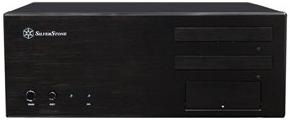
Shown above is Silverstone's ATX Desktop Case. Desktop cases are less common now, but
their main advantage is that you can place your display on top of the case and therefor use
less desk space. This case has 2 external 5.25" drive bays, 1 external 3.5" drive bay, and 6
internal 3.5" drive bays. One nice thing about this case is that it will take ATX or Micro
ATX form factor motherboards.
Computer cases are made of either plastic, aluminum, steel, or some combination of these
materials. Plastic is light and cheap and can be formed into very interesting shapes.
Aluminum is more expensive but it's light and can add additional heat sinking and electrical
grounding for the computers electronics. Steel is cheap and provides heat sinking, electrical
grounding, and EMI shielding, but it makes a computer more heavy. A steel case may be
required for a desktop case that needs to support a heavy monitor.
| 

 About BTH
 User Agreement
 Privacy
 Site Map
 Contact
 News Feeds


 RSS Feed
 Follow @Stephen Bucaro
 Windows Troubleshooting


