Your hard drive may show less space than the published specifications due to a number of reasons. 1. The way size is calculated and displayed. Some computers have a non-DOS hard drive partition that is used for features such as Hibernation, or Recovery...
Welcome to Bucaro TecHelp!

Welcome to Bucaro TecHelp!
Maintain Your Computer and Use it More Effectively
to Design a Web Site and Make Money on the Web

About Bucaro TecHelp About BTH User Agreement User Agreement Privacy Policy Privacy Site Map Site Map Contact Bucaro TecHelp Contact Advertise on Bucaro TecHelp Advertise Here RSS News Feeds News Feeds


Computer Repair with Diagnostic Flowcharts

Troubleshoot PC Hardware Problems With Flowcharts

This manual for troubleshooting PC hardware problems creates a visual expert system for diagnosing component failure and identifying conflicts.

The seventeen diagnostic flowcharts at the core of this book are intended for the intermediate to advanced hobbyist, or the beginning technician.

Click Here

Why Does My Hard Drive Show Less Space Than the Specification?
Compiled by the editors at TigerDirect.com

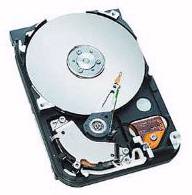
Hard Drive

Your hard drive may show less space than the published specifications due to a number of reasons.

1. The way size is calculated and displayed.

The definition of a megabytes (or gigabytes) is a unit of data storage capacity measured in 1,048,576 bytes (or 1024KB). The larger the numbers, the more apparent the size difference will be when listing the size as megabytes (or gigabytes) versus bytes. Actually, both numbers are correct. The noticeable difference is due to the 1024KB definition of a megabyte. This is why a 95.3GB hard drive can also be listed as having 102 billion bytes of total space. Just think of it as "round off"
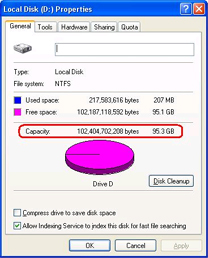
Disk Properties Dialog box

In the screen shot above: The first number is the total number of bytes, the second number is based on the number of megabytes or gigabytes.

2. Any "Partitions" on the disk will change the total in a specific partition.

Some computers have a non-DOS hard drive partition that is used for features such as Save to Disk, Hibernation, or Recovery. This partition is not normally reported by the operating system, although it can be viewed using a disk partition utility. This is very common on desktops and laptops. NOTE: Partition information will be created or formatted automatically during initial system setup and a system recovery.

3. Hidden files and folders decrease available space.

By default, all system files are hidden and cannot be seen. This may adversely affect the reporting of available hard drive space. You can set your Folder Options so you view system and hidden files and folders, but do be careful as changes to system files can adversely affect your system.

RSS Feed RSS Feed


Computer Sections

Troubleshooting and Maintaining Your PC All-in-One For Dummies

Troubleshooting and Maintaining Your PC All-in-One For Dummies

Diagnose and solve your PC problems with this easy-to-understand guide. It shows you how to diagnose and solve the most common hardware and software problems your PC may encounter.

It also provides you with methods for preventing PC problems in the first place and clearly explains how to create a safe and secure PC environment.

• Walks you through ways to diagnose the most common PC hardware, software, and operating system problems.
• Gives clear and easy-to-understand solutions for confidently handling these problems.
• Provides methods to maintain your system to prevent future problems.
• Reviews an array of useful diagnostic and maintenance tools.
• Covers Windows Vista and Windows 7.

Troubleshooting and Maintaining Your PC All-in-One For Dummies helps you to confidently handle whatever PC problems you may encounter. Click here for more information.


TigerDirect
[Site User Agreement] [Advertise on This site] [Search This Site] [Contact Form]
Copyright©2001-2011 Bucaro TecHelp 13771 N Fountain Hills Blvd Suite 114-248 Fountain Hills, AZ 85268

