Anatomy of a Liquid Crystal Display (LCD)
By Stephen Bucaro
Before about the year 2000, most desktop computers used cathode ray tube (CRT) monitors.
Liquid crystal displays had been used on laptop computers since the mid 1980s. Color LCD
displays have a sandwich-like structure as shown below.
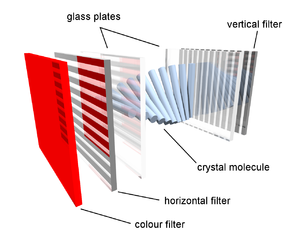
One layer of the sandwich has liquid crystal between two glass plates. One glass plate
has a matrix of thin film transistors on it. The liquid crystal layer is sandwiched between
two polarizing filters, one polarizinglight vertically and the other polarizing light
horizontally. Behind the sandwich-like structure is a fluorescent back light.
A pixel (picture element) is the smallest component of an image, creating a single dot
in the picture. Each individual pixel is divided into three cells, or subpixels, which are
colored red, green, and blue by the outer glass plate. To address a particular subpixel,
its row is switched on, and then a charge is to the correct column.
Liquid crystals move depending upon the charge applied to a tiny capacitor by its
related transistor. Each subpixel can be controlled independently to yield thousands of
possible colors for each pixel.
More Computer Anatomy Articles:
• PC Sound Circuitry
• How Hard Disks Work
• The Hard Disk Drive vs. The Solid State Disk
• CompTIA A+ Training Kit - Safety Issues
• What is Bluetooth?
• Buffered, Unbuffered, Registered Memory, What is the Difference?
• Video - How to Buy a Motherboard
• Understanding The Speed Of New Pci Express Data Bus
• How to Build a Computer
• How Does the CPU Cache Work?
| 

 About BTH
 User Agreement
 Privacy
 Site Map
 Contact
 News Feeds


 RSS Feed
 Follow @Stephen Bucaro
 Windows Troubleshooting


