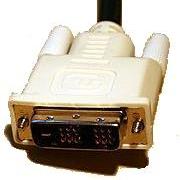
Today's computers use LCD (Liquid Crystal Display) displays. LCDs are a digital device. It makes little sense to convert the digital image data to analog just to convert it back to digital to display on the LCD. To avoid this double conversion, the DVI (Digital Video Interface) standard was developed.
Welcome to Bucaro TecHelp!

Welcome to Bucaro TecHelp!
Maintain Your Computer and Use it More Effectively
to Design a Web Site and Make Money on the Web

About Bucaro TecHelp About BTH User Agreement User Agreement Privacy Policy Privacy Site Map Site Map Contact Bucaro TecHelp Contact Advertise on Bucaro TecHelp Advertise Here RSS News Feeds News Feeds


Computer Repair with Diagnostic Flowcharts

Troubleshoot PC Hardware Problems With Flowcharts

This manual for troubleshooting PC hardware problems creates a visual expert system for diagnosing component failure and identifying conflicts.

The seventeen diagnostic flowcharts at the core of this book are intended for the intermediate to advanced hobbyist, or the beginning technician.

Click Here

Digital Video Interface (DVI)

For many years computers used CRT (Cathode Ray Tube) displays. CRTs are an analog device, so the digital image data of the computer was converted to an analog signal based on VGA (Video Graphics Array) standard. Today's computers use LCD (Liquid Crystal Display) displays. LCDs are a digital device. It makes little sense to convert the digital image data to analog just to convert it back to digital to display on the LCD. To avoid this double conversion, the DVI (Digital Video Interface) standard was developed.

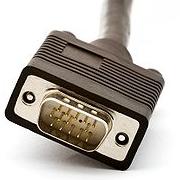
VGA Connector
VGA Connector
DVI Connector
DVI Connector

The DVI interface uses a different connector than VGA. In fact, there are four different versions of DVI connector.

DVI-A Connector

DVI-A - DVI Analog is used to send a DVI signal to an analog display. This is for use in applications, such as vector graphics, where an analog display is preferable.
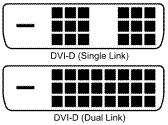
DVI-D Connector

DVI-D - DVI Digital sends digital video at 165Mhz in a format called TMDS (Transition Minimized Differential Signaling). DVI-D also comes in a dual link connector that sends two TMDS video streams allowing display resolutions up to 2560 x 1600 pixels.
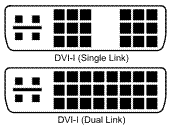
DVI-I Connector

DVI-I - DVI Digital and DVI Analog Integrated has pins to send both digital and analog video signals. DVI-I also comes in a dual link connector that sends two digital streams.
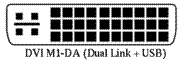
DVI M1-DA Connector

DVI M1-DA - DVI Digital and DVI Analog and USB Integrated has pins for digital and analog video signals plus a USB channel. The USB portion of this connector is used to control equipment such a video projector.

RSS Feed RSS Feed


Computer Sections

Troubleshooting and Maintaining Your PC All-in-One For Dummies

Troubleshooting and Maintaining Your PC All-in-One For Dummies

Diagnose and solve your PC problems with this easy-to-understand guide. It shows you how to diagnose and solve the most common hardware and software problems your PC may encounter.

It also provides you with methods for preventing PC problems in the first place and clearly explains how to create a safe and secure PC environment.

• Walks you through ways to diagnose the most common PC hardware, software, and operating system problems.
• Gives clear and easy-to-understand solutions for confidently handling these problems.
• Provides methods to maintain your system to prevent future problems.
• Reviews an array of useful diagnostic and maintenance tools.
• Covers Windows Vista and Windows 7.

Troubleshooting and Maintaining Your PC All-in-One For Dummies helps you to confidently handle whatever PC problems you may encounter. Click here for more information.


TigerDirect
[Site User Agreement] [Advertise on This site] [Search This Site] [Contact Form]
Copyright©2001-2011 Bucaro TecHelp 13771 N Fountain Hills Blvd Suite 114-248 Fountain Hills, AZ 85268