What is USB OTG?
By Stephen Bucaro
USB (Universal Serial Bus) is a wonderful technology because it allows hot swapping,
which is to connect and disconnect devices from the computer without rebooting the
computer. However, wouldn't it be even more wonderful if two USB devices, like a digital
camera and a storage device could connect to each other directly? That's what USB
On-The-Go (OTG) does.
Standard USB uses a master/slave architecture where a USB host acts as the master, and
a USB device acts as the slave. Only the Host can initiate data transfers over the link.
Standard USB devices cannot initiate data transfers, they only respond to requests given
by a host. In late 2001 the USB Implementers Forum released a supplement to the USB 2.0
specification called USB On-The-Go (USB OTG) that allows a USB device to perform both the
master and slave roles.
USB OTG defines two roles of devices: OTG A-device and OTG B-device. This terminology
defines which side supplies power to the link, and which is initially the host. The OTG
A-device is a power supplier, and an OTG B-device is a power consumer.
USB OTG introduced two new protocols; Session Request Protocol (SRP) and Host
Negotiation Protocol (HNP). SRP allows both communicating devices to control when the
link's power session is active. The OTG host can leave the USB link unpowered until the
USB device asks it to start delivering power. Leaving the USB link unpowered helps stretch
battery life.
HNP allows the two devices to exchange their Host/Device roles, provided both are OTG
dual-role devices. By using HNP for reversing Host/Device roles, any OTG device is capable
of initiating data-transfer over USB OTG bus.
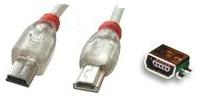
Mini-A plug Mini-B plug Mini-AB socket
The USB On-The-Go standard introduces a array of new connectors. Host-only devices will
provide a mini-A receptacle. Device-only devices will supply a mini-B receptacle. A
dual-role device will provide a micro-AB receptacle which can accept either a micro-A plug
or a micro-B plug. The OTG cable has a micro-A plug on one side, and a micro-B plug on the
other (it cannot have two plugs of the same type). When a dual-role device is connected to
a mini-A plug, it turns into a host. When a dual-role device is connected to a mini-B plug
instead, it a device.
USB OTG devices are backward-compatible with USB 2.0 and will behave as standard USB
hosts or devices when connected to standard (non-OTG) USB devices. Micro-A Adapters allow
for connection to Standard-A plug type USB cables, as used on standard USB 2.0 Devices.
More Computer Anatomy Articles:
• Anatomy of a Hard Drive
• Anatomy of a Liquid Crystal Display (LCD)
• Digital Video Interface (DVI)
• What is USB OTG?
• General Overview Of Motherboards
• 1G, 2G, 3G, and 4G Cellular Wireless Standards
• Serial ATA Hard Drive
• Hard Disk Drive Basics
• Rambus DRAM (RDRAM)
• Motherboard Form Factors
| 

 About BTH
 User Agreement
 Privacy
 Site Map
 Contact
 News Feeds


 RSS Feed
 Follow @Stephen Bucaro
 Windows Troubleshooting


