PC Keyboards
By Stephen Bucaro
The first PCs came with 83- or 84-key keyboards, today's computers use "enhanced" keyboards
with 104 or 105 keys. An enhanced keyboard has programmable function keys, a Windows key,
and an Application key. The Windows key opens the Start menu, which you can then navigate
with the cursor keys. The Application key works like the right mouse button, which brings
up a pop-up menu. These two keys allow you to operate the PC without a pointing device.
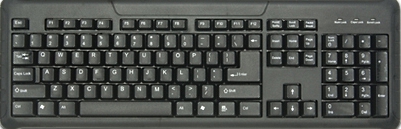
Today, there are many keyboard variations. Some keyboards have an integrated pointing
device such as a trackball. Ergonomic keyboards are designed to be more comfortable for
the hands and wrists. Regards of the variations, all keyboards, except those on notebook
computers, follow the 105-key standard. On notebook computers certain keys may be rearranged
because the keyboard is built into the system.
Keyboard Connectors
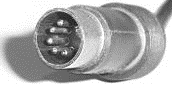
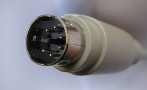
The first PCs used a 5-pin DIN connector. IBM used a 6-pin mini-DIN connector on its PS/2.
For this reason the 6-pin mini-DIN is sometimes called a PS/2 connector. Although there are
many PCs with PS/2 keyboards connectors still in use, most of today's PCs use a a USB port
to connect the keyboard. Wireless keyboards are the latest trend. Wireless keyboards don't
use a cord but instead use infrared technology or radio frequency to communicate with the controller.
Keyswitch Design
The first PCs came with keyboards that had a solid mechanical design. These keyboards made
a clicking noise when you pressed them which provided a satisfying tacktile feedback.
Since then there's been all kinds of design variations aimed at lowering the cost of
manufacturing keyboards.
"Dome-switch" keyboards are the most common design now in use. When a key is pressed, it
pushes down on a small rubber dome under the key. The dome touches a pair of conductive
lines on the circuit board below the key, creating a connection. Through the conductive
paths, the key press to be communicated to a microcontroller in the keyboard.
Keyboard Microcontroller
The first PC keyboards contained a single chip microcontroller which detected the voltages
from the key matrix and decoded them into key codes which could be read by the keyboard
controller on the motherboard. Today's keyboards contain custom chips which might add extra
features and convert the output to USB or wireless signal.
| 

 About BTH
 User Agreement
 Privacy
 Site Map
 Contact
 News Feeds


 RSS Feed
 Follow @Stephen Bucaro
 Windows Troubleshooting


