PC Video
By Stephen Bucaro
The video circuits of a computer take digital data and arrange it for display on a
screen. In the past, PCs used CRTs (Cathode Ray Tubes) for video display. A CRT is an
analog device, therefore the video circuit converted the digital video data to analog for
display. Today's PCs use LCDs (Liguid Crystal Displays) for video display. However, many
of today's PCs have video circuitry that converts digital video to analog for output. The
LCD display then converts the analog back to digital for use by its own hardware.
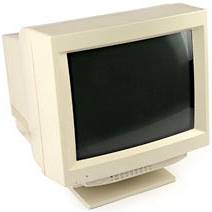
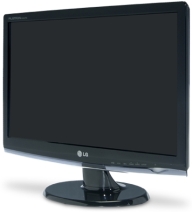
Cathode Ray Tube and Liguid Crystal Displays
Whether the display is CRT or LCD, the image is created with a matrix of dots (called
pixels for picture elements). The resoulution of a display is the number of pixels in the
horizontal and vertical directions. Early displays had a resolution of 320 pixels by 200
pixels (320 x 200). Today's displays can have a resolution of 2048 x 1536 or higher.
Another characteristic of a display is the color depth. The color depth is the number
of colors which can be displayed by each pixel. Early displays had a color depth of 16
colors (actually, the original IBM PC had a color depth of 2 - black and white). Today's
displays can have a color depth of 16.7 million different colors or more.
Standards for video displays are set by VESA (Video Electronics Standards Association).
The original 320 x 200 resolution standard was called VGA (Video Graphics Array). A new
standard that can display 1024 x 768 resolution with 256 different colors is called XGA
(Extended Graphics Array). An even newer standard that can display 1600 x 1200 resolution
with 16.7 million different colors is called SVGA (Super Video Graphics Array). Today's
video circuits can display 2048 x 1536 resolution or higher, but whatever the resolution,
it's usually just referred to as VGA.
The original IBM PC did not have the video circuit built-into the motherboard. The PC
builder was required to install a video card into one of the motherboard's expansion
slots. Almost all of today's motherboards have high-resolution video circuitry built-into
the motherboard (referred to as on-board video). However some PC users need better video
than the motherboard's on-board video. For example graphic designers and video game
players need high performance, high resolution displays. In this case, the motherboard's
on-board video circuitry can be disabled and a high performance video card can be
installed in an expansion slot.
VGA is sometimes called RGB video because it uses three separate signals for red,
green, and blue. Some video circuits provide video in other formats such as S-Video and
Composite Video. These formats are used to interface a PC to a TV.
As stated above, In the past, PCs used CRTs for video display. CRTs are an analog
device, so the digital image data of the computer was converted to an analog signal for
display. Today's computers use LCD displays. LCDs are a digital device. It makes little
sense to convert the digital image data to analog just to convert it back to digital to
display on the LCD. To avoid this double conversion, the DVI (Digital Video Interface)
standard was developed.
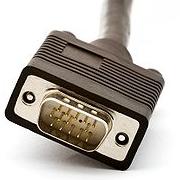
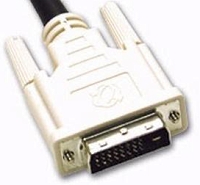
VGA Connector and DVI Connector
| 

 About BTH
 User Agreement
 Privacy
 Site Map
 Contact
 News Feeds


 RSS Feed
 Follow @Stephen Bucaro
 Windows Troubleshooting


