A Network Interface Card (NIC) is an expansion card that allows a PC to connect to a network. Though there are many different types of networks, PCs almost always use a NIC that interfaces to a wireless network or an Ethernet network.
Welcome to Bucaro TecHelp!

Welcome to Bucaro TecHelp!
Maintain Your Computer and Use it More Effectively
to Design a Web Site and Make Money on the Web

About Bucaro TecHelp About BTH User Agreement User Agreement Privacy Policy Privacy Site Map Site Map Contact Bucaro TecHelp Contact Advertise on Bucaro TecHelp Advertise Here RSS News Feeds News Feeds


Computer Repair with Diagnostic Flowcharts

Troubleshoot PC Hardware Problems With Flowcharts

This manual for troubleshooting PC hardware problems creates a visual expert system for diagnosing component failure and identifying conflicts.

The seventeen diagnostic flowcharts at the core of this book are intended for the intermediate to advanced hobbyist, or the beginning technician.

Click Here

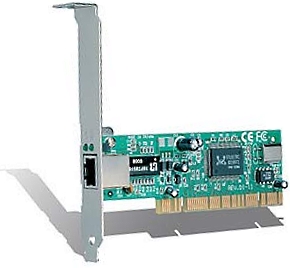
Network Interface Card (NIC)

A Network Interface Card (NIC), sometimes called a "network adapter" or "LAN adapter" is an expansion card that allows a PC to connect to a network. Though there are many different types of networks, PCs almost always use a NIC that interfaces to a wireless network or an Ethernet network.

Network Interface Card (NIC)
NIC with RJ45 connector port to
connect an Ethernet network cable.

Every NIC is identified on the network by a unique 48-bit serial number called a MAC (Media Access Control) address, which is stored in a ROM on the card. The MAC address is unique because NIC manufacturers purchase blocks of addresses from the IEEE (Institute of Electrical and Electronics Engineers).

In the past, if you wanted a PC to be able connect to a network, you needed to install a NIC. Today, most motherboards have Ethernet network circuitry built into the motherboard. However, if a PC needs multiple network interfaces, for example to have it function as a firewall or gateway.

More Computer Anatomy Articles:
• How Does the CPU Cache Work?
• Wireless USB
• ABC's Of DVD Drive Abbreviations
• General Overview Of Motherboards
• Intel Chipsets
• FREE Ebook - Computer Geeks Tech Tips
• IEEE-1394 FireWire
• The AMD Athlon 64 X2 Processor
• How a laser Printer Works
• PC Technician Street Smarts: A Real World Guide to CompTIA A+ Skills

RSS Feed RSS Feed


Computer Sections

Troubleshooting and Maintaining Your PC All-in-One For Dummies

Troubleshooting and Maintaining Your PC All-in-One For Dummies

Diagnose and solve your PC problems with this easy-to-understand guide. It shows you how to diagnose and solve the most common hardware and software problems your PC may encounter.

It also provides you with methods for preventing PC problems in the first place and clearly explains how to create a safe and secure PC environment.

• Walks you through ways to diagnose the most common PC hardware, software, and operating system problems.
• Gives clear and easy-to-understand solutions for confidently handling these problems.
• Provides methods to maintain your system to prevent future problems.
• Reviews an array of useful diagnostic and maintenance tools.
• Covers Windows Vista and Windows 7.

Troubleshooting and Maintaining Your PC All-in-One For Dummies helps you to confidently handle whatever PC problems you may encounter. Click here for more information.


TigerDirect
[Site User Agreement] [Advertise on This site] [Search This Site] [Contact Form]
Copyright©2001-2011 Bucaro TecHelp 13771 N Fountain Hills Blvd Suite 114-248 Fountain Hills, AZ 85268

