Rambus DRAM (RDRAM)
By Stephen Bucaro
Rambus DRAM (RDRAM) is a proprietary memory technology, designed by the Rambus Corporation,
that is found in some Pentium III and Pentium 4 systems built between 2000 and 2002. Conventional
SDRAM uses a data bus as wide as the processor's data bus (which today is 64 bits), RDRAM uses
only a 16-bit data bus. This, plus Rambus proprietary memory controller design allowed RDRAM
to run at faster speed than conventional SDRAM.
The first motherboards to support for RDRAM came out in 1999. They supported PC800 RDRAM, which
operates at 400 MHz but used both the rising and falling edge of the clock, resulting in effectively
800 MHz, and delivering 1600 MB⁄s of bandwidth over a 16-bit bus. This was faster than the best
SDRAM at the time, PC133, which operated at 133 MHz and delivered 1066 MB⁄s of bandwidth over
a 64-bit bus.
Then in 2000, DDR (Double Data Rate) PC-2100 SDRAM was introduced. It operated with a clock rate
of 133 MHz and a bandwidth of 2100 MB/s over a 64-bit bus. RDRAM has several problems; it suffers
from severe latency, it puts out significantly more heat than DDR SDRAM requiring heatsinks to
be mounted on all RDRAM modules, and due to high manufacturing costs and high license fees it's
twice the price of DDR SDRAM. RDRAM quickly became obsolete.
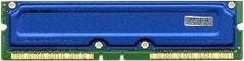
RDRAM modules come in a package called RIMM (Rambus Inline Memory Modules). A RIMM is similar
in size to a DIMM, but they are not interchangeable. Three different types of RIMMS are available:
a 16/18-bit version with 184 pins, a 32/36-bit version with 232 pins, and a 64/72-bit version
with 326 pins. All types plug into the same size connector, but the notches in the connectors
and RIMMS are different to prevent a mismatch. A given motherboard will accept only one type.
The RDRAM memory bus is a continuous path through each module, with each module having
input and output pins. Any sockets not containing a memory module must then be filled with a
continuity module called a CRIMM (Continuity Rambus Inline Memory Module) to compete the path.
A CRIMM module contains no memory, it serves only to compete the path. The paths at the end of
the bus are terminated with resistors on the motherboard.
More Computer Anatomy Articles:
• A Guide To Building Your Own PC
• How to Build Your Own PC - The Smart Way
• How is Data Written, Stored On, and Erased From Hard Disks?
• ABC's Of DVD Drive Abbreviations
• Motherboard Basics
• Windows Registry Basics
• An Overview of the Printed Circuit Board (PCB) Fabrication Process
• History of the QWERTY Keyboard
• IEEE 1284 Parallel Port
• How Does a Laptop Battery Work?
| 

 About BTH
 User Agreement
 Privacy
 Site Map
 Contact
 News Feeds


 RSS Feed
 Follow @Stephen Bucaro
 Windows Troubleshooting


